Production-grade signal routing
for TradingView and crypto exchange APIs
Secure webhook-to-exchange execution infrastructure. Trade-only API keys. No custody. No withdrawals. Built for strategy creators and automation-first traders.
Independent infrastructure. Non-custodial by design.
Signals Are Easy. Execution Is Hard.
Alerts don't place trades. They just notify you.
Generating trading signals isn't the difficult part.
Executing them instantly, reliably, and without manual intervention — that's where things break down.
Maybe you're using TradingView alerts, a custom bot, n8n or Make, or your own API system. But without a reliable execution layer, signals stay signals.
SignalToExchange provides the execution infrastructure to route signals to exchange orders reliably.
We're Not a Strategy Platform. We're the Relay Layer.
Built for consistent, reliable signal relay.
What we don't do
What we do
We receive a structured payload and translate it into a properly formatted exchange order. Think of us as the bridge between your signal source and your exchange.
We focus on one thing: turning structured signals into properly formatted exchange orders — reliably.
How Automation Works
Connect Your Exchange
Secure trade-only API keys. You stay in control.
Send a Signal
From TradingView, a bot, or any webhook system.
We Validate & Format
Orders are structured correctly for your exchange.
Order Is Submitted Automatically
Reliable infrastructure. Consistent execution. No manual intervention.
Execution Architecture
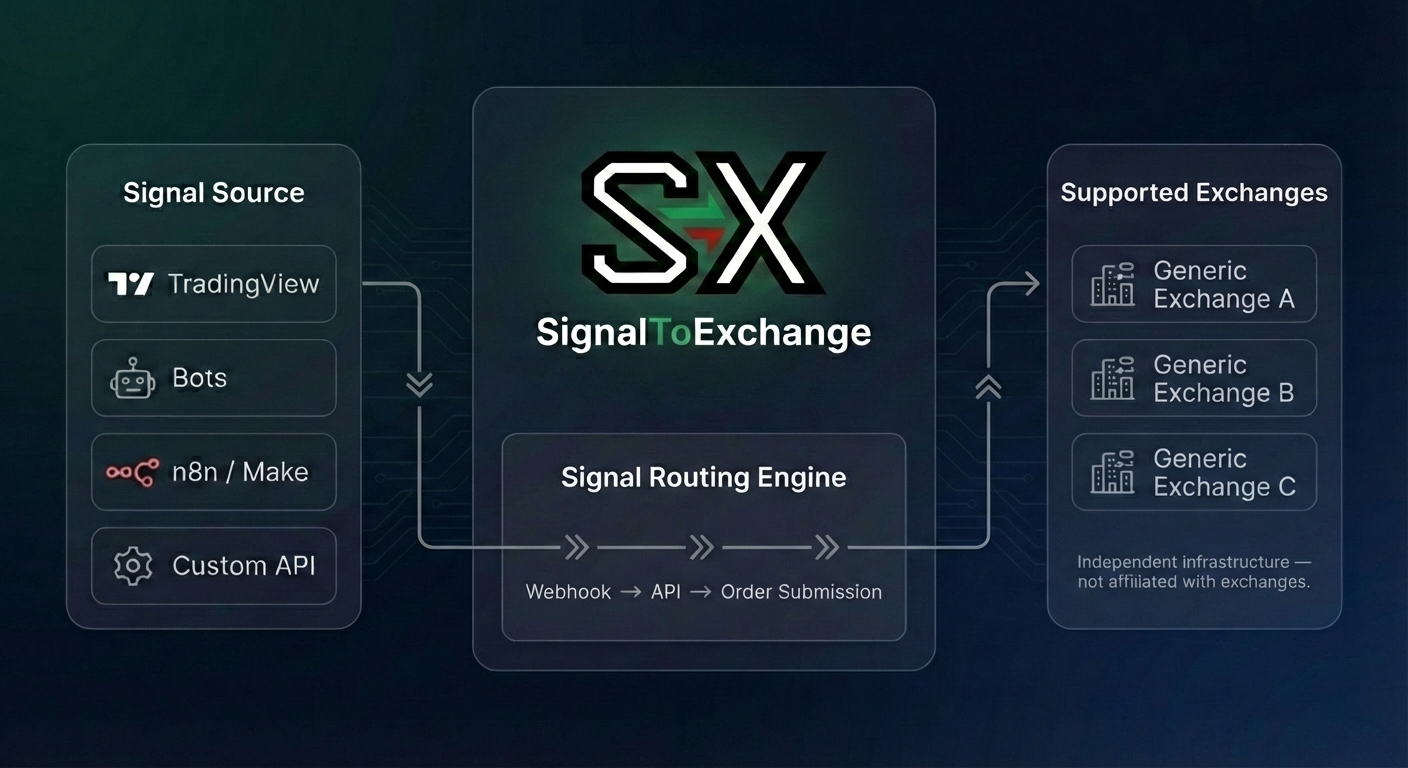
SignalToExchange operates as a stateless routing layer between your signal source and exchange API.
Webhook Ingestion
Signals are received via secure HTTPS webhook endpoints.
Signature Validation
Payloads are validated to prevent spoofed or unauthorized requests.
Order Translation
Signal data is normalized and translated into exchange-specific order formats.
Exchange API Execution
Orders are submitted via trade-only API keys with withdrawal permissions disabled.
Additional safeguards:
Funds remain on your exchange account at all times.
{
  "action": "buy",
  "symbol": "{{ticker}}",
  "price": "{{close}}"
}
Send this payload from TradingView, n8n, Make, or your own backend.
TradingView Is the Most Common Starting Point
TradingView alerts are the most common way users automate their strategies. If you already use TradingView, setup takes minutes.
Create an alert
Set up an alert on any chart, indicator, or Pine Script strategy.
Add our webhook URL
Paste your unique webhook URL into the alert's notification settings.
Structure the message
Format your alert message with action, symbol, and any parameters you need.
Orders submit automatically
Your alerts fire, we receive them, and the order is submitted to your exchange.
Not using TradingView? Any webhook- or API-capable system can send signals to SignalToExchange.
But We're Built for Any Signal Source
SignalToExchange works with any system capable of sending a webhook or API request. If it can send a payload, we can relay it.
Custom trading bots
Send order payloads from your own bot or strategy engine.
n8n workflows
Trigger orders from n8n automation flows via webhook.
Make automations
Connect Make scenarios to submit orders automatically.
Server-side applications
Call our API from any backend service or script.
Any webhook system
If it can send a payload, we can relay it.
If it can send a structured payload, we can relay it.
Built for Pine Script Authors and Signal Providers
If you publish TradingView strategies or run a signal community, your audience eventually asks the same question:
"How do I auto-execute this?"
SignalToExchange provides secure execution infrastructure so your community can route webhook alerts directly to supported exchanges using trade-only API keys.
You stay focused on strategy.
|We handle execution routing.
- No custody of funds
- No withdrawal permissions
- Trade-only API enforcement
- Secure webhook validation
- Built for real automation workflows
Built for Strategy Creators and Automation-First Traders
Strategy creators
- Route TradingView signals to exchange APIs
- Non-custodial execution infrastructure
- Consistent, reliable signal relay
Developers & advanced users
- Managed execution infrastructure without self-hosting
- Structured order formatting with idempotency enforcement
- HMAC-SHA256 webhook verification and trade-only API key enforcement
- Independent relay layer with exchange-level precision
You control the logic. We handle the relay.
Supports leading crypto exchanges
One dashboard. Multiple exchanges. Add trade-only keys and route signals where you want.
Binance
Coinbase
Kraken
Bybit
OKX
Don't see your exchange?
Request an exchangeWe only support trade-only API keys. No withdrawals. Ever.
Signal To Exchange is not affiliated with or endorsed by any exchange.
You Keep Control of Your Funds
We transmit instructions. Your exchange executes them.
We never custody funds
Your funds stay on your exchange at all times. We only transmit trade instructions.
Trade-only API keys
We only accept trade-only permissions — no withdrawals. We never ask for passwords, seed phrases, or private keys.
Revoke access anytime
Delete your API keys from our platform or revoke them on your exchange at any time.
Simple pricing. No surprises.
One plan. Everything included. Transparent pricing.
Pro Relay
7-day free trial included
One flat fee. No volume tiers.
Billed monthly. Cancel anytime.
Billed yearly at $192/year. Save 20%.
Non-custodial. Trade-only API keys.
Everything included: bots, exchange connections, monitoring, and logs.
- 30 bots — run multiple strategies
- All supported exchanges — and more coming
- Unlimited signals — no caps on volume
- Low-latency relay — millisecond-level order submission
- Real-time dashboard — monitor every order
- IP allowlisting — extra security layer
Cancel anytime.
7-day free trial included
You will never be asked for exchange passwords.
Frequently asked questions
Everything you need to know about Signal To Exchange.
How fast is execution?
Is my exchange API key safe?
Do I need to know how to code?
What happens if Signal To Exchange goes down?
Does it only work with TradingView?
What order types are supported?
What exchanges are supported?
Does SignalToExchange provide trading advice?
Managed Execution Infrastructure
Self-hosted execution requires:
SignalToExchange provides the execution layer.
You define the strategy.
We provide the infrastructure.
Independent infrastructure. Non-custodial. Trade-only API enforcement.
Secure Signal Routing Infrastructure
Non-custodial execution. Trade-only API keys. Independent infrastructure built for reliability.
Request Early AccessTrade-only API key enforcement. No withdrawal permissions. No custody.